

Before you start
Suggestions begin after your first build. Before that, the Tasks page shows:Start your first build and your daily suggestions will appear here. with a What’s your idea? button.
The page
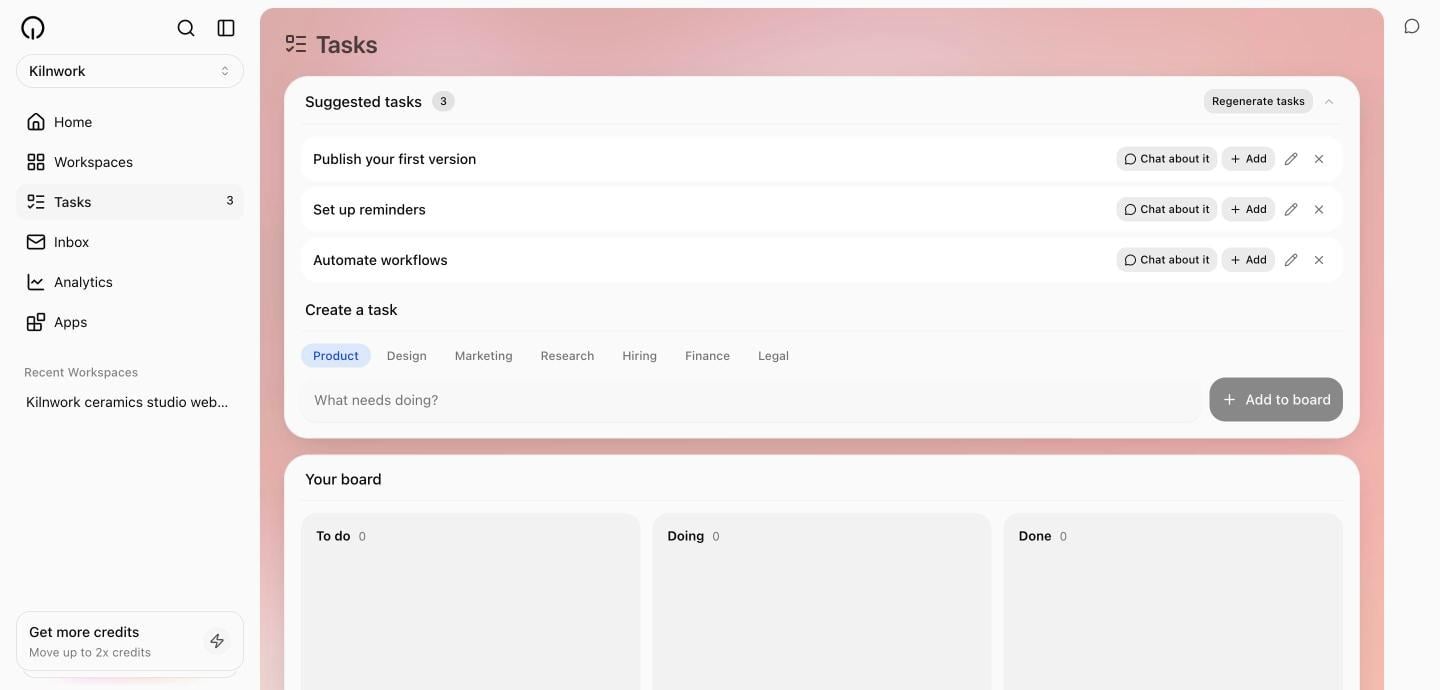
Select Tasks in the sidebar — its badge shows how many tasks are open. The page stacks three cards:- Get started — the same checklist as Home, until you finish or dismiss it.
- Suggested tasks — today’s slate, plus Create a task for your own.
- Your board — the tasks you have accepted.
Work the suggestions
Each suggestion is one decision. Its row offers:
Dismissing teaches the system:
Dismissed. Your team takes the hint. A dismissed kind of task rests for a week before it can be suggested again.
Want a different slate? Select Regenerate tasks. There is a daily cap; when you reach it: That is all for today. Fresh tasks arrive tomorrow.
On your first visit of the day the slate may take a moment:
Still putting today's tasks together. Try again in a moment.How many suggestions you see
The visible slate is sized by plan: 3 per day on Free, 5 on paid plans. Suggestions expire overnight unless you accept them — accepting pins a task so it survives.The board
Three columns: To do, Doing, Done. Drag cards between them. Dragging a task you verify yourself into Done completes it —Nice. One step closer. Removing a suggested task from the board returns it to suggestions: Back in suggestions.
Some tasks complete themselves: publishing your first version, naming your company, topping up credits — Skarmy checks these against what actually happened, so they move to done without your word.
Where a card sits on the board is saved on this device only. The tasks themselves are yours everywhere, but the column layout does not sync.
Create your own tasks
Under Create a task, pick a domain — Product, Design, Marketing, Research, Hiring, Finance, or Legal — write what needs doing, and select Add to board. Your own tasks behave like accepted suggestions.What the suggestions are grounded in
The daily slate is written from your business plan and your company’s real state — what has been built, published, and done. A sharper plan produces sharper tasks. See Your business plan.Milestones
As your company moves, it passes milestones: Company created, First build, Company named, Identity written, First publish. They appear on your dashboard’s Performance card — a record of the ground actually covered.Delegation
Task cards show a Delegate action, but it is not live yet — selecting it says so. Today, you do the tasks; Skarmy suggests them.Verify
- Today’s suggestions refer to your company specifically, not generic startup advice.
- An accepted task appears in To do and survives overnight.
- A completed event task (like your first publish) moves to Done on its own.
Troubleshooting
Next
Your business plan
The document your daily tasks are grounded in.
Automations
Put the repeat work on a schedule instead.