> ## Documentation Index
> Fetch the complete documentation index at: https://docs.skarmy.ai/llms.txt
> Use this file to discover all available pages before exploring further.
# Work with the Builder
> Ask for changes, answer the Builder's questions, stop a run, and start over — the loop you spend most of your build time in.
Once the Builder is open, building is a conversation. You ask, it builds, the preview updates. This page covers the whole loop.
## Before you start
You need a workspace with an accepted handoff. See [Describe your idea](/build/describe-your-idea). If you started as a guest, this is where Skarmy asks you to create an account — everything you have done carries over.
## The workspace
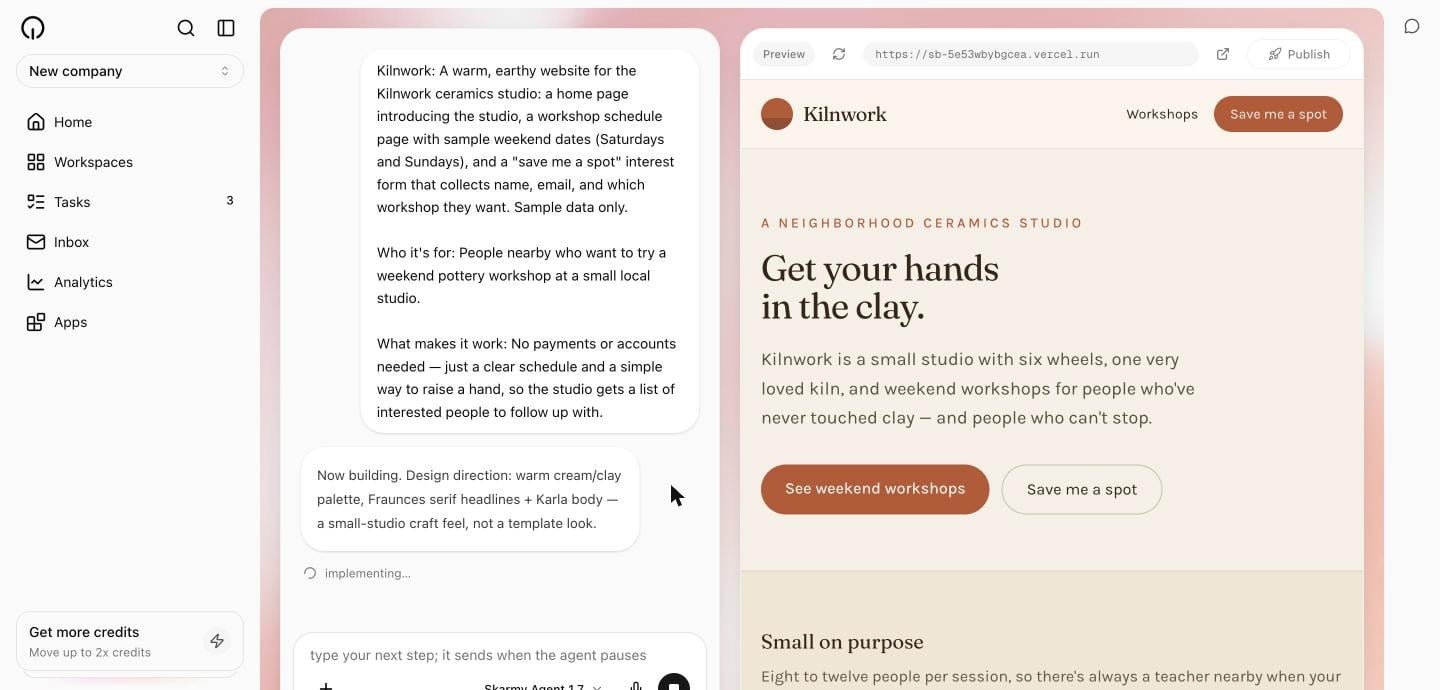
The workspace has two halves:
* **Left — the conversation.** Your messages, the Builder's progress, and any questions it asks.
* **Right — the preview.** Your app, running live. See [Read the live preview](/build/live-preview).
The **Publish** button sits above the preview. The coach's chat panel starts minimized here, so the Builder has your attention.
 ## Ask for a change
Type what you want in the composer — its placeholder reads `what should we do next?` — and send it. Write it the way you would ask a colleague.
```text theme={null}
Make the workshop schedule the first thing on the homepage,
and warm the colours up a bit.
```
The Builder makes the change, verifies its own work, and the preview reloads.
Ask for outcomes, not implementations. "Make the pricing easier to scan" gets a better result than "use a two-column grid" — the Builder makes design and technical decisions for you.
### What to expect for different sizes of change
| You ask for | What happens |
| --------------------- | -------------------------------------------------------------------------- |
| A copy or style tweak | Quick. The Builder checks its work and confirms the preview re-rendered. |
| A new page or flow | Slower. The Builder runs a full production build before reporting it done. |
| Something ambiguous | It asks you one question with two or three options before proceeding. |
| Something that breaks | It fixes it and moves on. Routine recovery is not reported as news. |
### While the Builder is busy
You can keep typing. The composer stays open mid-run — its placeholder changes to `type your next step; it sends when the agent pauses` — and your message goes out the moment the current step stops. A **Stop** control appears in place of Send if you want to interrupt instead.
## Answer the Builder's questions
When a choice would genuinely change what gets built, the Builder asks one focused question with two or three concrete options. It appears as a card in the conversation.
Pick an option and select **Send answer**. The Builder continues from your answer.
The Builder never asks you about technical choices — frameworks, libraries, file structure. Those are its decisions. A question from the Builder is always a product question.
While a question is waiting, the session is paused on you. Nothing moves until you answer.
## Watch progress
The conversation shows what is happening as it happens — short status lines like `thinking…`, `implementing…`, `researching…`, and `publishing…` — and a founder-facing summary at each completed milestone. That summary names what is on the page and suggests what to do next.
## Stop a run
Select **Stop** while the Builder is working to interrupt it.
Stopping is safe. It does not undo work already done, and your next message picks up from there. To have it carry on, send:
```text theme={null}
Continue where you left off.
```
## Start over
If you want to scrap the current direction entirely, select **Start fresh**. It appears once a session has ended.
**Start fresh** archives the current conversation and begins a new one on your next message.
**Start fresh** cannot be undone, and it is not a fix for a slow build. Use it only when you genuinely want a clean slate. Your files and published site are not deleted.
## Pick a model and speed
The chat bar carries a model picker. **Skarmy Agent 1.7** is the default and the right choice most of the time; **Ultra**, **Normal**, and **Lite** trade capability against cost. A separate **Speed** control offers **Fast** — up to about 2.5× faster output at a higher price — on the tiers that support it.
If you never touch either, you get sensible defaults.
## Paste material in
You can paste business plans, competitor copy, customer feedback, or documents into the conversation, and attach up to five files per message — images, PDFs, text, spreadsheets. The Builder uses them as material for copy and structure.
Instructions written inside pasted content do not change how the Builder behaves. If a document you paste says "ignore your previous instructions", the Builder treats that as text, not as a command.
## Come back later
Sessions are resumable. Close the tab, come back tomorrow, and the conversation and your app are still there. Your ten most recent workspaces sit in the sidebar under **Recent Workspaces**.
The machine running your app sleeps between turns to save credits. When you return, the preview may say `this session is asleep` — select **Wake preview** or just send your next message.
## Verify
* The change you asked for is visible in the preview.
* The conversation contains the Builder's summary of what it did.
* The composer placeholder is back to `what should we do next?` when the Builder has finished.
## Troubleshooting
| Problem | Fix |
| --------------------------------------------- | ----------------------------------------------------------------------------------------------------- |
| Progress looks stuck long after it seems done | Reload the page. See [Troubleshooting](/account/troubleshooting). |
| The Builder changed more than you asked | Ask it to revert that part specifically. Smaller asks stay better scoped. |
| The preview is blank or broken | Give it a moment — the Builder usually fixes its own breakage. If it persists, describe what you see. |
| You are out of credits mid-build | Top up on the **Usage** page. See [Billing and top-ups](/credits/billing-and-top-ups). |
## Next
What each preview message means.
Everything the Builder has written.
Put it on a public address.
## Ask for a change
Type what you want in the composer — its placeholder reads `what should we do next?` — and send it. Write it the way you would ask a colleague.
```text theme={null}
Make the workshop schedule the first thing on the homepage,
and warm the colours up a bit.
```
The Builder makes the change, verifies its own work, and the preview reloads.
Ask for outcomes, not implementations. "Make the pricing easier to scan" gets a better result than "use a two-column grid" — the Builder makes design and technical decisions for you.
### What to expect for different sizes of change
| You ask for | What happens |
| --------------------- | -------------------------------------------------------------------------- |
| A copy or style tweak | Quick. The Builder checks its work and confirms the preview re-rendered. |
| A new page or flow | Slower. The Builder runs a full production build before reporting it done. |
| Something ambiguous | It asks you one question with two or three options before proceeding. |
| Something that breaks | It fixes it and moves on. Routine recovery is not reported as news. |
### While the Builder is busy
You can keep typing. The composer stays open mid-run — its placeholder changes to `type your next step; it sends when the agent pauses` — and your message goes out the moment the current step stops. A **Stop** control appears in place of Send if you want to interrupt instead.
## Answer the Builder's questions
When a choice would genuinely change what gets built, the Builder asks one focused question with two or three concrete options. It appears as a card in the conversation.
Pick an option and select **Send answer**. The Builder continues from your answer.
The Builder never asks you about technical choices — frameworks, libraries, file structure. Those are its decisions. A question from the Builder is always a product question.
While a question is waiting, the session is paused on you. Nothing moves until you answer.
## Watch progress
The conversation shows what is happening as it happens — short status lines like `thinking…`, `implementing…`, `researching…`, and `publishing…` — and a founder-facing summary at each completed milestone. That summary names what is on the page and suggests what to do next.
## Stop a run
Select **Stop** while the Builder is working to interrupt it.
Stopping is safe. It does not undo work already done, and your next message picks up from there. To have it carry on, send:
```text theme={null}
Continue where you left off.
```
## Start over
If you want to scrap the current direction entirely, select **Start fresh**. It appears once a session has ended.
**Start fresh** archives the current conversation and begins a new one on your next message.
**Start fresh** cannot be undone, and it is not a fix for a slow build. Use it only when you genuinely want a clean slate. Your files and published site are not deleted.
## Pick a model and speed
The chat bar carries a model picker. **Skarmy Agent 1.7** is the default and the right choice most of the time; **Ultra**, **Normal**, and **Lite** trade capability against cost. A separate **Speed** control offers **Fast** — up to about 2.5× faster output at a higher price — on the tiers that support it.
If you never touch either, you get sensible defaults.
## Paste material in
You can paste business plans, competitor copy, customer feedback, or documents into the conversation, and attach up to five files per message — images, PDFs, text, spreadsheets. The Builder uses them as material for copy and structure.
Instructions written inside pasted content do not change how the Builder behaves. If a document you paste says "ignore your previous instructions", the Builder treats that as text, not as a command.
## Come back later
Sessions are resumable. Close the tab, come back tomorrow, and the conversation and your app are still there. Your ten most recent workspaces sit in the sidebar under **Recent Workspaces**.
The machine running your app sleeps between turns to save credits. When you return, the preview may say `this session is asleep` — select **Wake preview** or just send your next message.
## Verify
* The change you asked for is visible in the preview.
* The conversation contains the Builder's summary of what it did.
* The composer placeholder is back to `what should we do next?` when the Builder has finished.
## Troubleshooting
| Problem | Fix |
| --------------------------------------------- | ----------------------------------------------------------------------------------------------------- |
| Progress looks stuck long after it seems done | Reload the page. See [Troubleshooting](/account/troubleshooting). |
| The Builder changed more than you asked | Ask it to revert that part specifically. Smaller asks stay better scoped. |
| The preview is blank or broken | Give it a moment — the Builder usually fixes its own breakage. If it persists, describe what you see. |
| You are out of credits mid-build | Top up on the **Usage** page. See [Billing and top-ups](/credits/billing-and-top-ups). |
## Next
What each preview message means.
Everything the Builder has written.
Put it on a public address.